01. Remapping
Background
Webpages connect different quantums of information or media.
Increasingly, this information becomes commodified or pockmarked with means for commodification (ads, subscription services, pop-ups for mailing lists). Additionally, websites and apps become standardized experiences with many of the same features, making them indistinguishable from one another, except perhaps by the demographics that use them and the underlying algorithms. Cory Doctorow refers to this as the “enshittification”↗. This project will explore both the technical aspects of web design and development while examining it as a means of expression.
For this project you’ll take an experience, place or thing and "remap" it to a website. This could be as expressive and poetic or didactic and explanatory as you’d like. For example, if your desire is to be a web designer or developer, you might create a mini-website that promotes a conference in a more traditional way. You could also create a site that attempts to explain a dream you had and tries to show your impression of the passage of time in that dream or the complication of a space that looks like your middle school but has a chair from your childhood home.
These are not necessarily mutually exclusive from each other; a “weird” dream website could be viral marketing for a summer blockbuster movie, but I encourage you to explore what is true for you.
Objectives
- Gain greater facility and confidence with web design and development
- Understand and explore different means of site navigation
- Understand the translation process from idea to code.
- Explore the web as a means of self-expression; be that for expressly “commercial” or poetic means.
Requirements
- Detailed notes/mindmaps or other residue of your ideation
- Clear wireframe drawings for a website explaining how pages will link together (digital or “analog”)
- Final functioning website (this should be at least ~5 pages, but you have ideas for a large single page website)
Final Deliverables
-
A folder containing the following items:
- A link to your final website (on your purchase web-space or otherwise)
- A subfolder or compressed archive (.zip, tar.gz, etc) with all code and media for your website
- A sub folder with all wireframe drawings
- A sub folder containing all mockups/notes/etc.
Considerations
- “Secrets” are okay → If you want to do something with jumpscares or the site is part of some ARG and you need to be discrete about what you are doing, I might ask that you show me what you are doing or planning but if you’d like to “hide” some of this from the class for effect that is okay.
- Simulation is okay → We will not be going over server side programming (like PHP, Ruby on Rails, etc.) These are typically the technologies used in order to create databases where you can create users and automate some of your page layout. If your idea would be to create, for example, a fictional social media website that allows you to “look at” aspects of your dreams, you could make a website that advertises or promotes this or you could create a website that simulates what the user experience is like.
- Correlation is not success → You might incorporate transitional animations in your website prototype that you can’t yet achieve or slightly simplify your site to make it work in code. The point is to understand this translation process and less to make everything translate 100% to code.
No Shuriken Mode Challenges
(This is where "no shuriken mode" comes from)
(These do not guarantee a better grade, they are merely suggestions for what might be a superlative project, or a jumping off point if you're not sure what to do technologically)
- Create a mobile or other responsive version of your website
- Work with someone else in the class to create a larger “ARG-type” experience that connects to an “easter egg” in an animation assignment or “erroneous” link in the spreadsheet
- Create a rudimentary “Choose Your Own Adventure” game based on a childhood experience you rehash in your mind frequently.
- Work with someone in Computer Science or New Media to create a rudimentary game in a Javascript Canvas
Grading
| Grading Criterion | % points |
|---|---|
| All files/requirements are present and clearly labeled / organized | 05% |
| Code contains comments (notes, separators, ancillary imagery) | 05% |
| Steps of project are completed with timeliness to facilitate in-class discussion | 05% |
| Willingness to ask for assistance / seek ways to augment project if needed | 05% |
| Strength of ideas as expressed through notes and one-on-ones and presentations | 10% |
| Clarity of expression of ideas via notes and one-on-ones and presentations | 10% |
| Craft and clarity of notes and sketches is clear and appropriate | 10% |
| Digital craft and clarity of code | 10% |
| Translation process from idea → wireframe → website | 10% |
| Overall efficacy and strength of concept | 30% |
Examples that are not student work
- The old Radiohead website↗ This is from ~1997. Some of the type sizes may not hold up, you might have to zoom in. I encourage you to look at this and consider this was the web presence of a commercial successful musical group.
- Comic Con Website↗ This website is somewhat more technologically sophisticated than what we’ve done in class, but consider the simplicity of the information it must convey (prices, times, etc.) in relation to how it relates an experience to the user.
- April Grieman Design Quarterly Poster(1986)
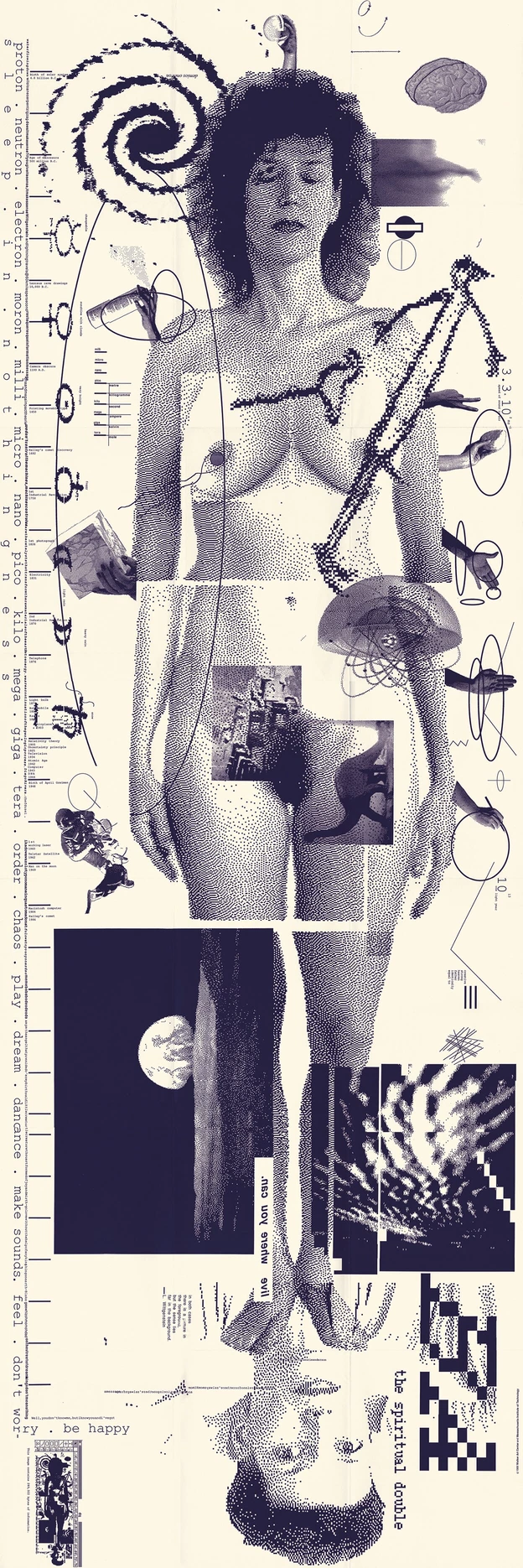 (Note this is traditionally displayed horizontally). Not a website but a really powerful piece that marks the onset and possibility for expression of digital tools. Additionally it is a great example “remapping” an idea (one’s understanding of one’s self) to a different form.
Past Examples
(Please note these are presented with no specific order or preference, and know that the terms of the assignment in a past semester might be different)
- Emma Bordt, Spring 2023 → An exploration of a breakup
- Sarah McDonald, Spring 2023 → Looking at the feeling of being lost in space
- Holden King Bascom, Spring 2023 → Examining the feeling of cracking open an energy drink
- EPILEPSY WARNING! Nichy Beltran, Spring 2023 → Uses a series of "quizzes" to explore a feeling of disorientation
- Emily Bozentko, Spring 2024 → Recalls a dream she had
- Madelaine Pascua, Spring 2024 → Creates a "hidden object game" about a lost duckling
Relevant Dates
-
01/29/2026 → Intro + Ideas
- In class → I will present this project to you
- For Homework → You will work on your initial ideas. Create three (3) ideas for possible directions for the project with detailed sketches of how you might depict these concepts, or what the window might look like. Create a moodboard (or similar visual repository) of inspirations for your visual direction.
-
02/05/2026 → Ideas + Wireframes
- In class → You will present your ideas in one-on-one sessions
- For Homework → You will work on initial wireframes and revised ideas. You should have a detailed drawn (digitally or physically) map of the pages on your site, and how they interconnect, or what parts of the page might change.
-
02/12/2026 → Feedback on Revised Ideas + Initial Wireframes
- In class → You will present wireframes and revised ideas.
- For Homework → You will revise wireframes, and possibly begin asset production or begin a prototype.
-
02/19/2026 → Progress update on Initial Prototype + Asset Production
- In class → You will present progress on your prototype/wireframes
- For Homework → You will continue to work on your sites code and asset production
-
02/26/2026 → Progress update on Revised Prototype + Asset Production
- In class → We will decide who will present on what day, and who will write about who. You will present closer to final progress with an eye toward technical issues.
- For Homework → You will continue to work on your sites code and asset production, and finish your project for critique
-
03/05/2026 → Progress update on Revised Prototype + Asset Production
- In class → We will decide who will present on what day, and who will write about who. You will present closer to final progress with an eye toward technical issues.
- For Homework → You will continue to work on your sites code and asset production, and finish your project for critique
-
03/12/2026 → Final week of work
- In class → Present projects and work on statements (Group #1)
- For Homework → Revise your project based on feedback, prepare written statements
-
03/19/2026 → Final Critique
- In class → Present projects and work on statements
- For Homework → Revise your project based on feedback, prepare written statements
-
03/26/2026 → Spring Break!
-
04/02/2026 → Statement Review
- In class → Review and collect written statements. Discuss project